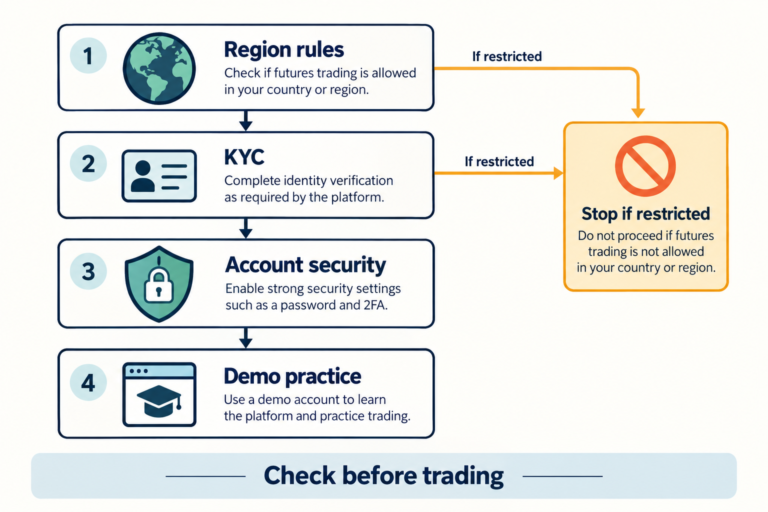

Bybit Copy Trading follows this sequence: check your eligibility and the trader’s requirements in Copy Trading Classic, set your investment amount, copy mode, loss limits, and stopping method, then start copying. After starting, do not rely solely on the “Following” label; check whether new orders placed afterward were actually filled in your account. When stopping, canceling the copy relationship and closing remaining positions are separate actions. Your balance is automatically returned to your Funding Account only when both conditions are met.
This guide is for people considering USDT perpetual contracts in Bybit Copy Trading Classic for the first time. Rather than comparing exchanges or ranking returns, it focuses on setup → confirming that copying is working → troubleshooting failures → stopping and checking your balance.
Written and verified by: CoinPop Editorial | Date official documents were checked: | This is not a first-hand account of operating an account with real funds. The images below are explanatory diagrams created by CoinPop; they are not actual app screens or official Bybit images.
Important restrictions to check first: Copy trading does not guarantee your principal and involves the risks of futures, leverage, and forced liquidation. First check eligibility and regulations applicable to your residence, account, and product. On October 13, 2026, the Financial Intelligence Unit warned about the risks of using unregistered providers and the legal risks of referrals that facilitate or arrange sign-ups. This article does not guarantee the current registration status of any provider or the legality of using its services, and does not explain how to bypass access or KYC restrictions. Official source from the Financial Services Commission and FIU
If the small English labels in an explanatory diagram are difficult to read, select the image to view it at full size. The key information and calculations are also provided in the Korean text and tables.
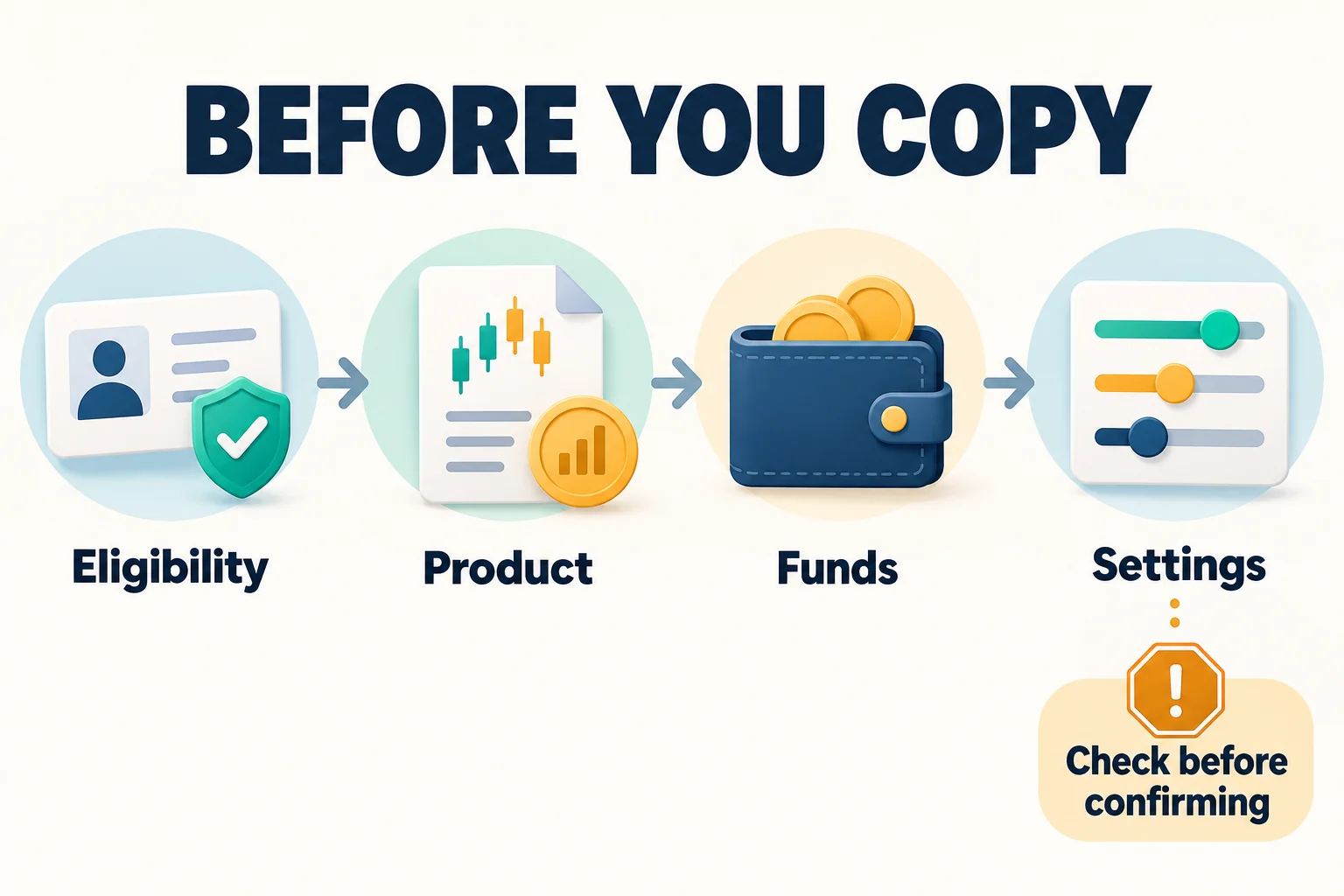
1. Before Starting Copy Trading: Check Your Account, Product, and Funds
It is easy to assume that “once you choose a trader, everything else happens automatically,” but you should distinguish among these four stages before starting: account registration, KYC completion, product availability, and actual copy order execution.
| Item to check | What to expect and when to stop |
|---|---|
| Eligibility | The official Classic FAQ requires Individual KYC Lv.1 or Business KYC. Completing verification does not mean that residence- or product-based restrictions are lifted. Stop if you see a restriction or eligibility notice. |
| Product name | Check that the product is Copy Trading Classic. Do not apply the minimum amounts, settlement rules, or termination terms for other products such as Pro or TradFi to this guide. |
| Minimum investment | The general minimum in the official getting started guide is 100 USDT, but a trader may set a higher requirement. The current terms on the profile take precedence. The minimum is not a recommended investment amount or a safety threshold. |
| Loss tolerance | Keep these funds separate from living expenses and money set aside for repayments. Do not rush to invest real funds if you have not first decided how much you can afford to lose and when to stop, rather than focusing on returns. |
References: Classic FAQ on KYC and supported assets, official getting started guide on minimum amounts and product scope. For account registration requirements, see the separate Bybit Account Creation, KYC, and Security Guide.
2. Initial Bybit Copy Trading Setup: What Should You Decide?
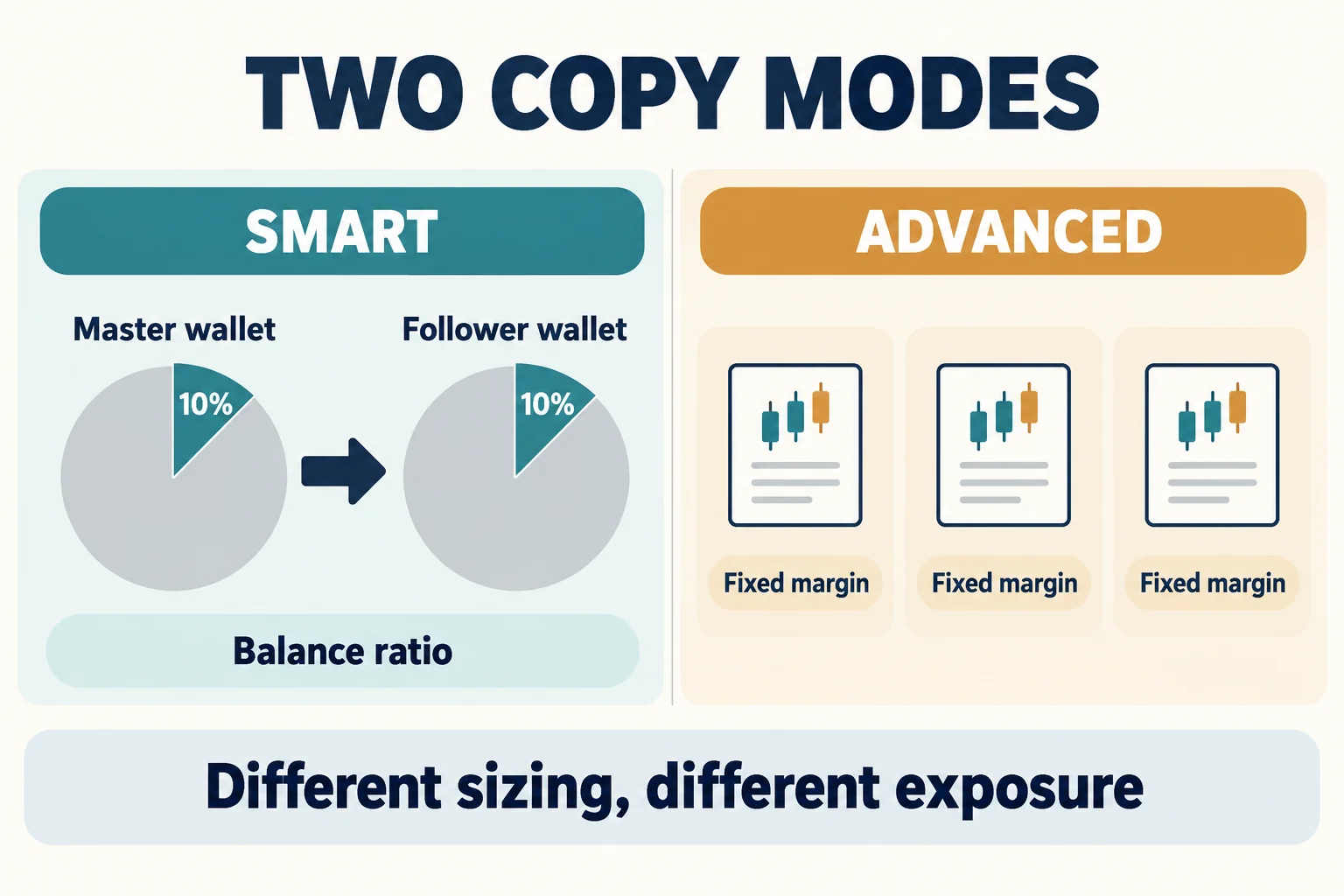
Smart Copy and Advanced Copy use different methods to determine “order size”
| Smart Copy | Advanced Copy |
|---|---|
| Applies to the follower’s available balance a ratio based on the trader’s order cost and available balance. Leverage follows the trader. | You set a fixed margin per order. Where available, you can select additional settings such as leverage. |
| Following the ratio does not mean that your execution price, liquidation price, or final return will be the same. | A fixed amount does not mean your total exposure is fixed. As orders accumulate, the margin used and risk may also increase. |
For example, if the trader’s order cost-to-available balance ratio is 10% and your available balance when you place the order is 1,000 USDT, the simple proportional calculation gives 100 USDT. This is an assumption used to illustrate order size, not a recommendation to “invest 10%.” Actual results depend on minimum order sizes, fees, balance, and execution conditions. Official explanation of copy modes and settings
Check SyncMaster’s Forced Sync first
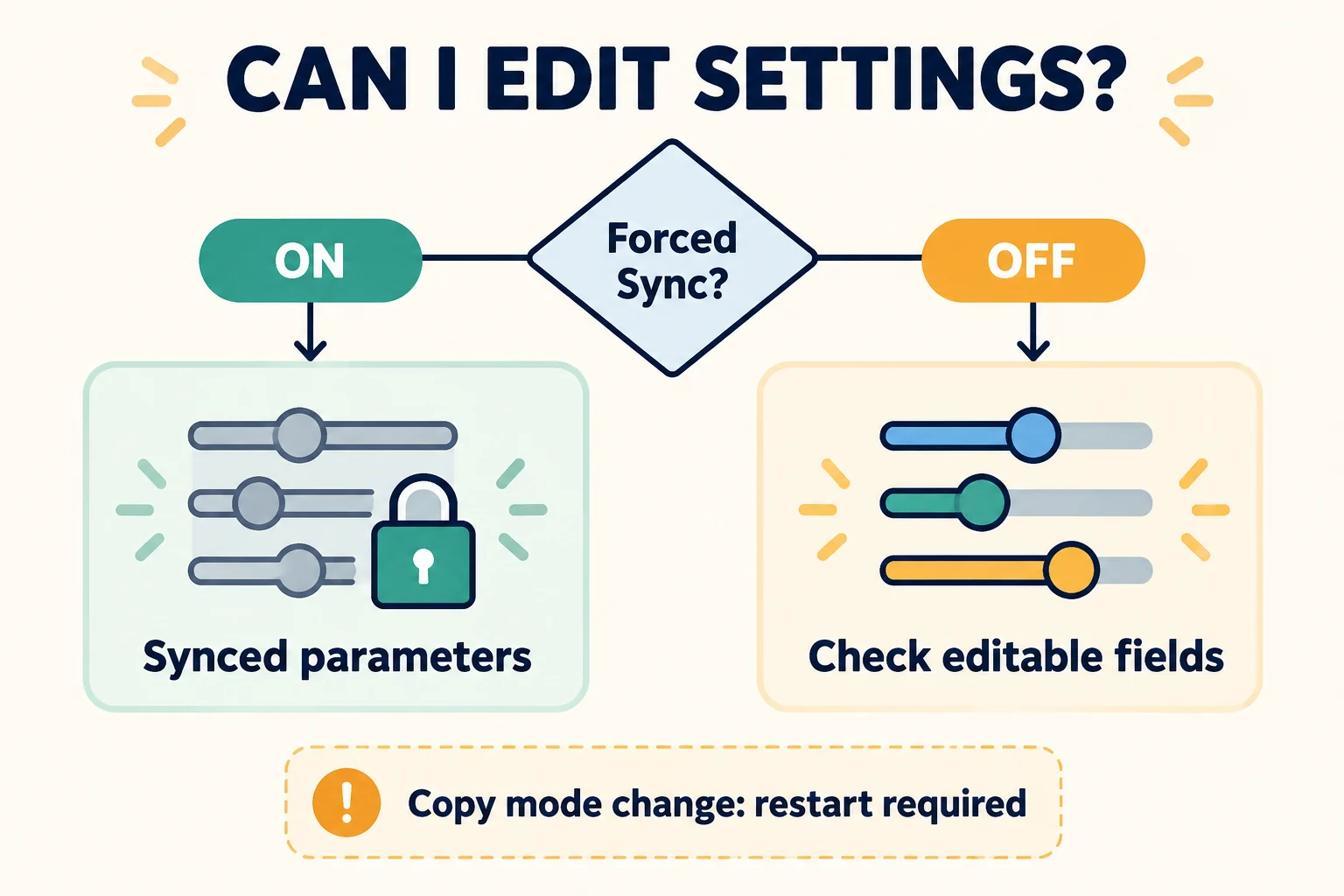
If a trader uses Forced Sync, direct changes to More Settings for USDT perpetual copying are restricted. Do not assume that locked settings indicate an error, or that you can change the desired items later. Conversely, the absence of Forced Sync does not mean that every item can always be changed.
The official getting started guide says you must cancel existing copy trading and start again to change the copy mode itself. If the trader’s capacity is full when you try to follow again, you may not be able to select the same trader. To adjust other settings, go to User Center, open the relevant trader’s Details → Configure Settings, and check which items can actually be edited and how the changes will apply. Guide to changing settings and switching modes
What to check when starting on a PC or in the app
- Open the product: On a PC, check the product name on the Copy Trading Classic page; in the app, check it under Copy Trading on the home screen. Menu locations and wording may vary by app version and language.
- Check the profile: Review the selected trader’s current minimum amount, allocation ratio, and copy availability. Do not choose based on a single return figure; also consider the strategy and loss history. Differences between exchanges are covered in Copy Trading Exchange Comparisons and Evaluation Criteria.
- Review settings: Check Investment, copy mode, Forced Sync, editable risk settings, and how positions are handled when copying is stopped.
- Recheck before confirming: Confirm only if you have read and understood the terms and risk disclosures. Do not press Copy Now if you do not understand the figures or what they apply to.
- Check after confirming: Check your follow history and whether the investment amount is reflected, then separately verify execution after new orders appear.
Here, “checking the result” does not mean checking whether you made a profit. It means verifying that the conditions you selected took effect and that no unexpected trades appeared.
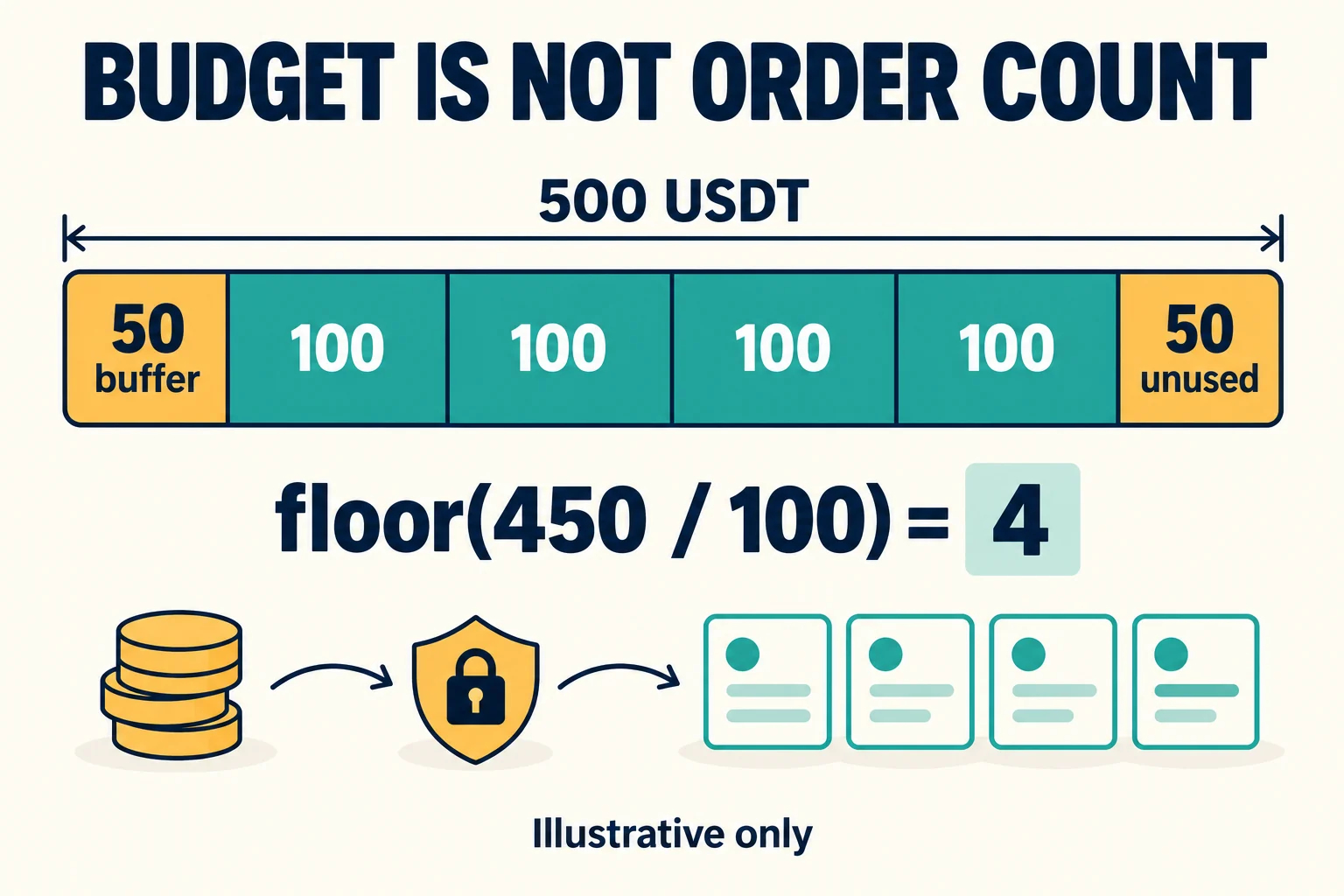
3. With 500 USDT invested and 100 per order, can you place five orders?
Simply calculating 500 ÷ 100 overlooks costs and changes in your balance. In addition to margin per order, trading costs, unrealized P&L, margin already in use, limits, and minimum order requirements for each contract all matter. “Fixed margin” does not mean that you can always get that number of orders filled.
Illustrative calculation by CoinPop
Assume a total budget of 500 USDT, a separate buffer of 50 USDT, and margin of 100 USDT per order. The amount available for order calculations is 450 USDT. With 450 ÷ 100 = 4.5, discard the fractional part to get 4 whole orders, leaving 50 USDT unused. Buffer 50 + margin used 400 + remaining funds 50 = total 500 USDT.
This calculation is based on the simple assumption that costs and profit/loss do not change and there are no other restrictions. The buffer of 50 and the 10% ratio are not recommended values, and do not predict the actual number of orders you can place or your loss limit.
You cannot determine whether cross or isolated margin is safe based on its name alone. Cross margin may expose the available balance in the relevant account to risk, while isolated margin does not prevent the specified margin from being lost or liquidated. Even if you switch to lower leverage, the required margin may increase, preventing the change from being applied. Therefore, check the outcome of the change in your actual records. Official FAQ on leverage and liquidation
4. Verify that everything works after getting started: following and execution are different
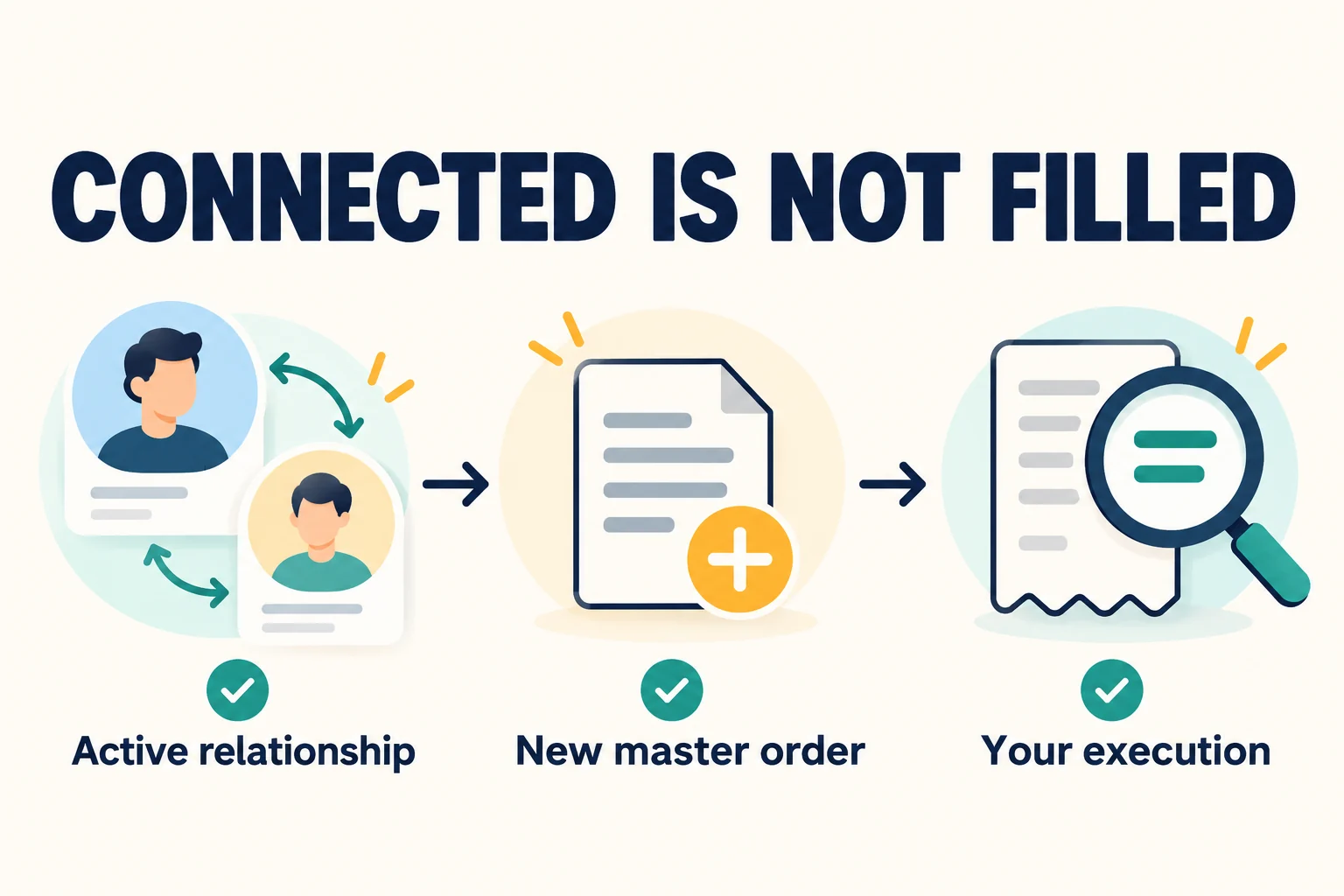
At first, checking the following three steps separately can help avoid confusion.
- Relationship: Is the trader visible under Current Copy Trades in the User Center?
- Target order: Did the trader place a new order after I started following them?
- My execution: Are my quantity, execution price, and costs recorded under Trades → Open Position/Details or History Orders?
This does not work by belatedly buying the trader's pre-existing open positions as they are. Therefore, an active relationship with no positions does not by itself indicate an error. However, check the order records and notifications to determine whether there was no new order or an actual copy was rejected.
In your records, distinguish available balance and total assets, unrealized P&L and P&L on closed orders, and profit sharing deducted in advance and settled profit sharing. Orders for the same instrument and direction may appear combined as one position, so do not immediately conclude that anything is missing just because the number of rows on the trader's screen differs from the number of rows in your positions. Review the average entry price alongside the individual order records. Guide to the Follower User Center screens and metrics
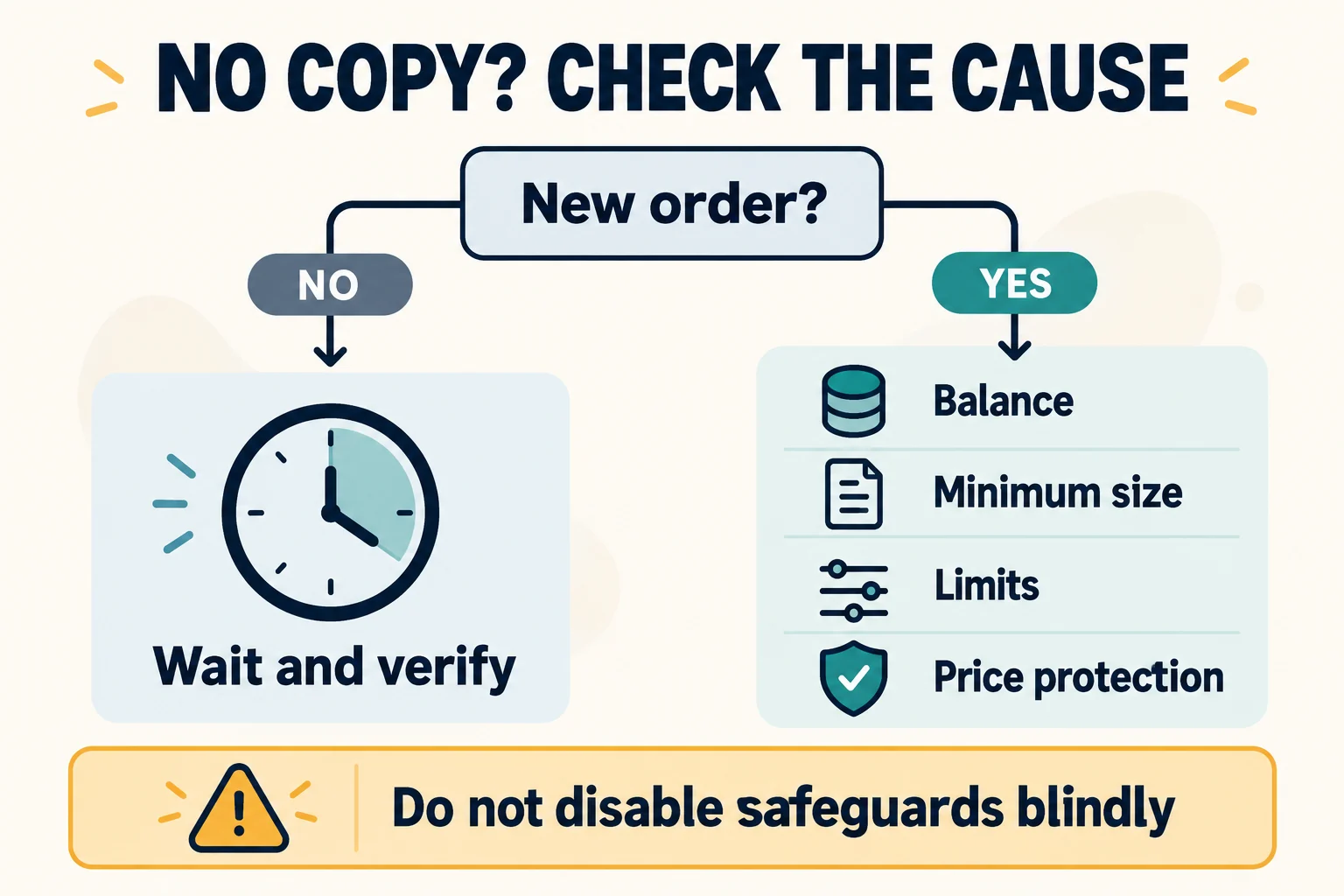
5. When copying does not work: identify the cause before increasing risk
| What you see | What to check first |
|---|---|
| No orders on my side yet | First check whether any new orders were placed after you started following. Distinguish a situation where there were only existing positions from an order rejection. |
| Failure related to balance or minimum order | Check the current available balance—not the total deposited amount—as well as the minimum quantity for each contract, order costs, and leverage requirements. |
| Only a specific order is missing | Compare the slippage limit, CopyGuard, selected contracts, daily/contract limits, and the failure reason in the order details. |
| Unable to follow additional traders | Check the trader's current capacity and availability. Creating another account or bypassing restrictions is not a solution. |
An order not being copied due to price protection may mean the feature is working as intended. The official FAQ explains that trades excluded by CopyGuard do not count as general copy failures. It is not appropriate to recommend disabling protection or increasing slippage, leverage, or investment as a blanket solution. If you do not understand the cause and exposure to loss, consider stopping rather than adding new funds. Official explanation of position differences and missed copies
Smart Mode: In some cases, the order may be adjusted to the minimum size
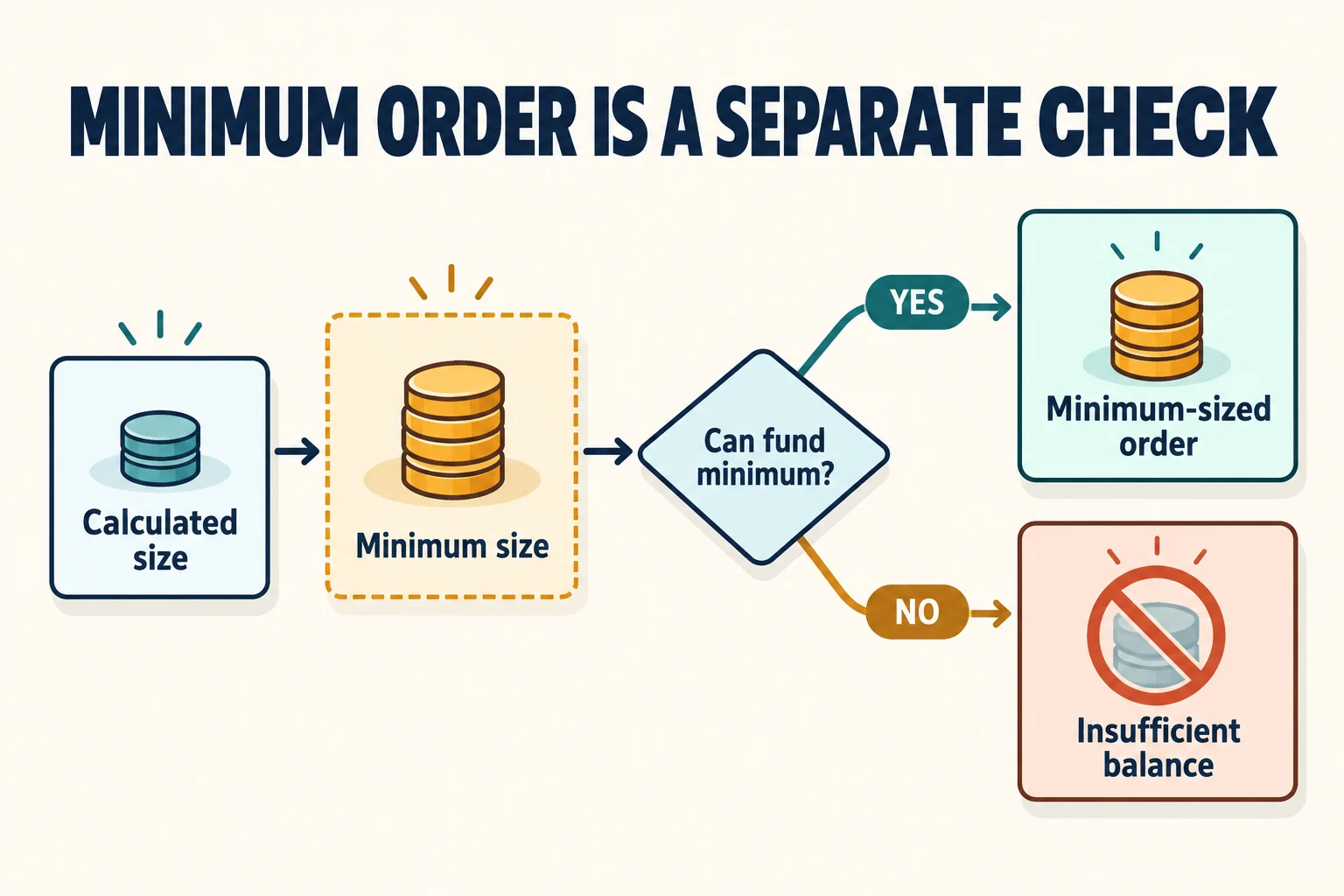
Do not assume that “if the quantity calculated based on the ratio is below the minimum order size, it will always fail.” The official explanation of the difference states that in Smart Mode, when the calculated quantity is small, it may be executed at the minimum order quantity, but if the available balance cannot cover even that minimum order, the order may not be placed. Minimum quantities can vary by contract and over time, so a fixed BTC quantity should not be used as a universal benchmark.
This adjustment means that a larger proportion than initially calculated may be used. A small balance does not automatically mean a lower order risk. Increasing leverage to meet the minimum order can also increase the risk of loss.
6. Setting loss limits: PCSL does not guarantee the amount recovered
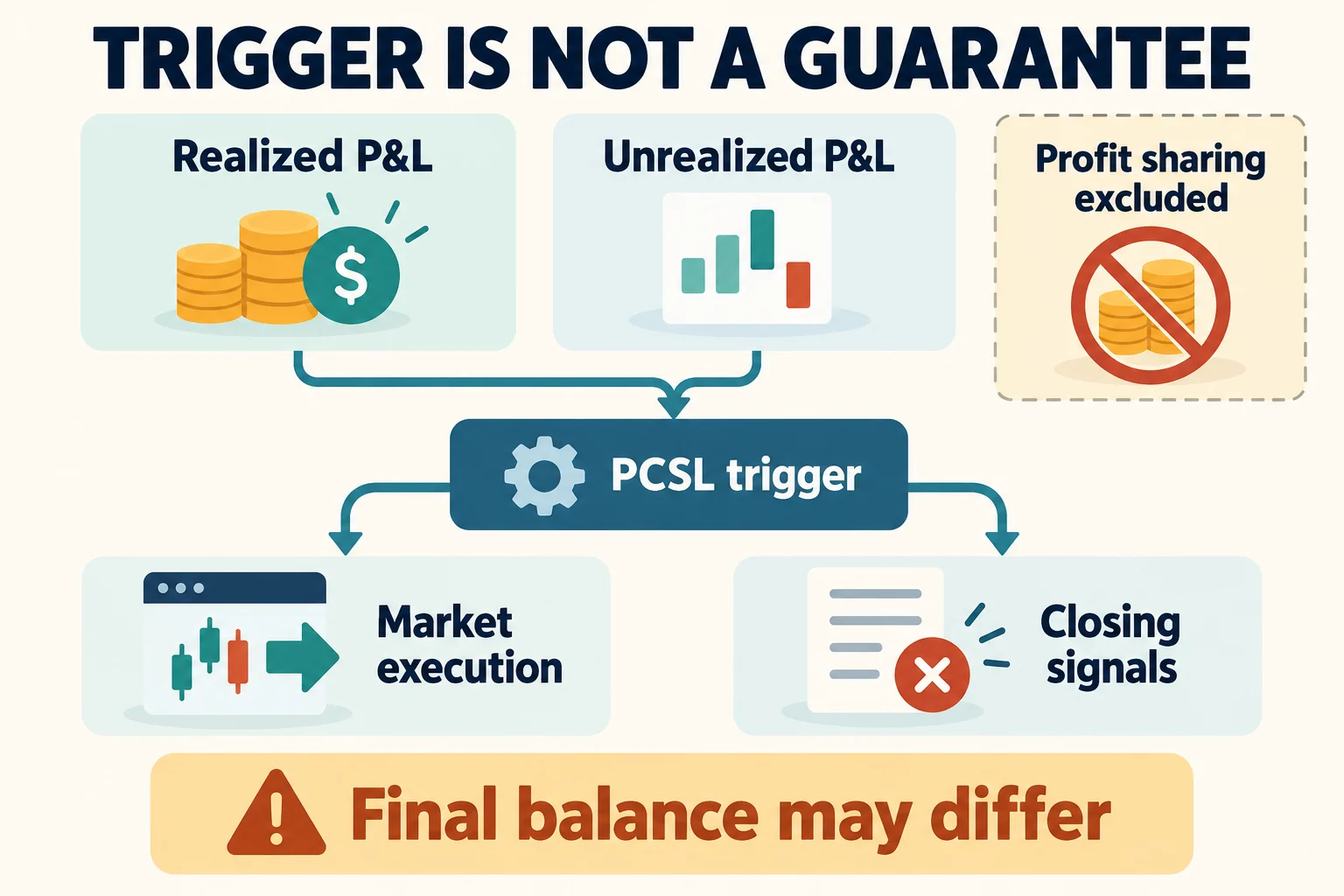
PCSL stands for Perpetual/Perp Copy Stop Loss; it does not mean a loss limit exclusive to Pro. It is a copy-trading stop mechanism based on realized and unrealized P&L from USDT perpetual trades following that trader.
The remaining risk when PCSL is triggered depends on whether the remaining positions are closed at market price or you wait for the trader's closing signal. The official explanation states that asset changes due to profit sharing are excluded from the PCSL calculation, and that the actual amount recovered may be less than the estimated assets shown on screen. The basis may also change when you reset settings or change your investment amount, so reread the current value after saving. Official explanation of PCSL and risk settings
| Mechanism | What should be distinguished? |
|---|---|
| Per-order TP/SL | Sets the target/stop loss and trigger reference price for a specific order or position. This is different from limiting total account losses. |
| PCSL | Operates based on the P&L of the copy relationship with that trader. The trigger conditions are separate from the actual closing execution and balance. |
| Trailing Stop | Tracks a specified pullback from the highest recorded asset value. It does not guarantee fixed principal or a guaranteed closing price. |
Market volatility, slippage, insufficient liquidity, and service delays remain possible. Even if a setting shows a number such as “stop loss 50,” you cannot say that total losses will stop exactly at 50. If a setting is unavailable, locked, or unclear to you, do not leave it unattended just because trading is automated.
7. Calculate fees, funding, and profit sharing separately
Actual costs should be considered separately as entry and exit trading fees, funding paid or received at settlement, and the profit share for the relevant trader. Funding is not always a cost, nor does it occur every eight hours for every contract. You need to check the contract's current settlement interval and whether you held a position at that time. For instructions on comparing rates and transaction records, see Guide to checking actual Bybit trading costs.
The Classic profit-sharing rate is not a flat 10%. The official table lists 10%, 12%, and 15% by tier, so check the current rate on the selected trader's profile. The official settlement period runs from Saturday 00:00 UTC to Friday 23:59:59 UTC, and the settlement time is Monday 03:00 UTC. In Korea Standard Time, that is Saturday 09:00 to the following Saturday 08:59:59, with settlement on Monday at 12:00.
Example of 12 deducted in advance, 8 as the final share, and 4 refunded
The following is an illustrative assumption in which all related positions in the same settlement period have been closed, the net P&L after entry and exit trading fees is +120 USDT on the first trade and −40 USDT on the next, and the profit-sharing rate is 10%. This is not actual investment performance, nor does it mean that P&L from different periods is automatically combined.
| Item | Illustrative calculation |
|---|---|
| Advance deduction from initial profit | 120 × 10% = 12 USDT |
| Net P&L for the period | 120 − 40 = 80 USDT |
| Final profit share | 80 × 10% = 8 USDT |
| Refund of excess advance deduction | 12 − 8 = 4 USDT |
| Profit after profit sharing in this example | 80 − 8 = 72 USDT. Separate funding payments or receipts are not included here. |
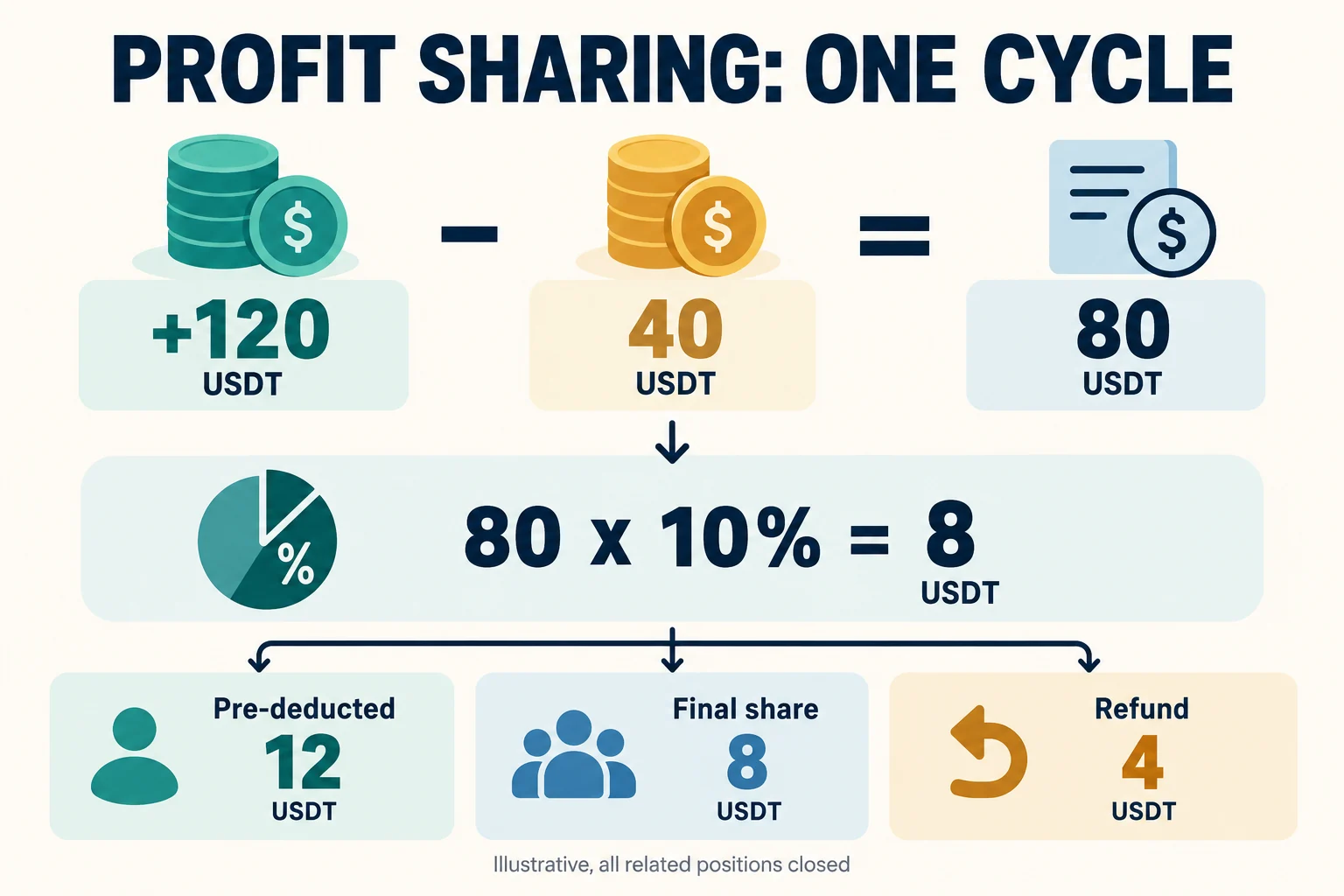
The official profit-sharing calculation is position P&L minus entry and exit fees. Equating this figure with the final balance in your account may lead you to overlook funding, additional deposits or withdrawals, and other factors. If related positions opened on the same day remain open, profit sharing or refunds may carry over to the next period. Distinguish advance deductions from finalized settlements. Official rules for profit sharing, settlement, and refunds
8. Stopping Bybit Copy Trading and withdrawing your balance
Clicking Stop Copying does not immediately end all trades. Read the options for handling remaining positions in the confirmation window.
| Stop options | Resulting status and items to check |
|---|---|
| Close remaining positions at market | Close at the current market price. Check the execution price, slippage, and closing costs, and make sure no quantity remains under Open Position. |
| Close by following the trader’s closing signals | Follow only the closing signals for existing positions. New orders and position changes will not be copied, and market risk remains until the positions actually close. |
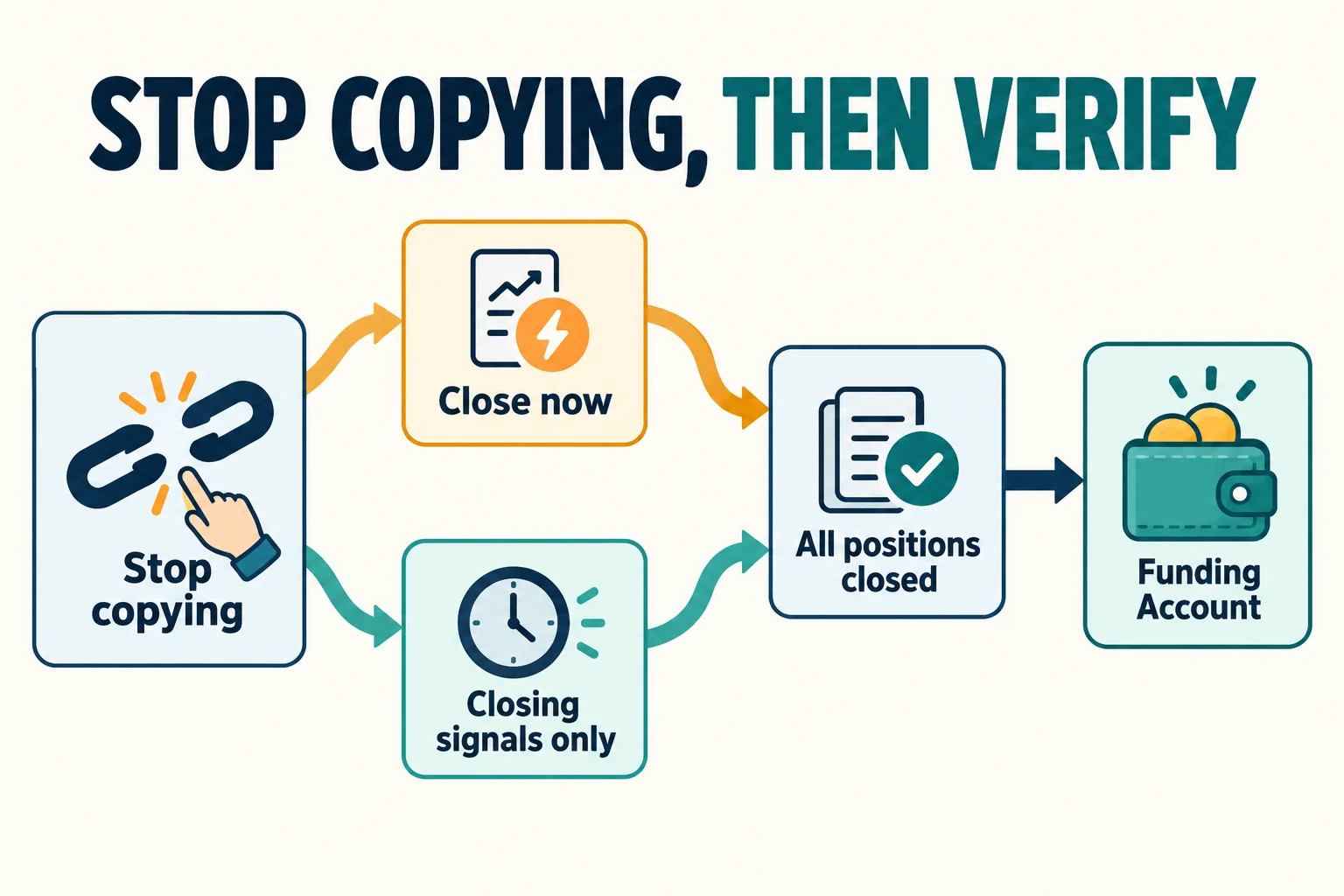
- Check the cancellation status for the trader.
- Check that all open positions and remaining quantities have been closed.
- Compare the amount returned to the Funding Account with your transaction history. Official guidance states that funds are automatically returned to the Funding Account after cancellation and closing all positions, regardless of which account, such as UTA, was used to invest initially.
- If profit sharing has not yet been settled, record unrealized allocations and expected refunds separately from the amount currently returned.
If you do not see the return, first check whether any positions remain open, whether closing signals are pending, or whether any contracts have suspended trading. In particular, if TradFi perpetual trading is temporarily suspended due to a stock split or similar event, copying may be canceled, but closing the affected position and moving related funds may be restricted until trading resumes. Do not interpret this exception as a fixed waiting period for ordinary Classic crypto contracts. Official guidance on cancellation, automatic returns, and trading suspension exceptions
9. Checklists: Before, During, and After Copying
- Before starting: Have you reviewed eligibility, the exact product, minimum amount, allocation ratio, Forced Sync, configurable items, loss limits, and stop options?
- After starting: Have you checked the follow relationship separately from actual executions? What are your available balance, execution price, liquidation price, and costs?
- If a problem occurs: Have you distinguished between no new order being placed and an order failing? Are you considering disabling protections or adding funds without knowing the reason for the failure?
- After stopping: Have you checked the cancellation status, that no positions remain, the Funding return history, and any unsettled allocations or refunds?
Frequently Asked Questions
Is Smart Mode always safer for beginners?
No. Automatic ratio calculation and loss risk are separate issues. You also need to consider the trader’s leverage and accumulated orders, your minimum-order adjustment, and execution differences. No mode can be considered suitable for everyone.
Can I copy every trader with a minimum of 100 USDT?
No. The general minimum amount differs from the amount required for each trader. Eligibility, capacity, balance, and contract conditions also apply separately. Meeting the minimum amount does not guarantee that every order will be executed.
Why could my account be at a loss when the trader is making a profit?
The start time, orders actually copied, average entry price, execution costs, leverage, and balance may differ. First compare the same period and the same orders; do not directly compare the trader’s returns over their entire history with the returns over your own copying period.
Can I stop and restart immediately just to change modes?
The official procedure is to cancel and then restart to switch modes, but closing may incur costs and market exposure, and there may be no capacity to follow the trader again. It is not the same as simply toggling a setting.
Does having PCSL eliminate liquidation or additional losses?
No. PCSL is a mechanism with trigger and handling rules; it cannot eliminate all risks, including liquidation, slippage, and unsettled allocations. If you select the option to wait for positions to close after it is triggered, position risk may continue.
If I stopped copying but cannot see the funds in UTA, do I need to transfer them manually?
First check the Funding Account and transaction history. According to official guidance, automatic return requires copying to be canceled and all positions to be closed. Do not assume the funds will return to the account you initially used.
Official Sources, Verification Method, and Update Criteria
The titles and contents of the official help articles below, along with the original text from the regulatory authority, were cross-checked on October 18, 2026. The calculations in this article are for illustrative purposes by CoinPop and are based on the stated assumptions. The actual eligibility of a Bybit logged-in account, the latest app screens, and live-fund executions were not tested directly. If the current terms, supported regions, or product conditions shown in the actual interface differ, stop and confirm with official support.
- How to Get Started With Copy Trading Classic (Followers) — Displayed update date: 2026-10-15. Starting, changing modes, stopping, and return conditions.
- FAQ — Copy Trading Classic — Displayed update date: 2026-10-15. KYC, new orders, risks, and failure conditions.
- Copy Mode and Parameter Settings — Displayed update date: 2026-07-10. Copy methods, forced synchronization, and configuration scope.
- Understanding Discrepancies Between Master Traders and Followers’ Position — Displayed update date: 2026-09-07. Differences arising from balance, minimum orders, and price protection.
- How to Navigate Copy Trading User Center (Follower) — Displayed update date: 2026-09-07. Checking balances, positions, and order history.
- Copy Trading: Profit Sharing Explained — Displayed update date: 2026-02-25. Settlement cycles, advance deductions, and refunds. The 10% mentioned in general text was not interpreted as a fixed rate for all tiers.
- Financial Services Commission and FIU: Notice on Blocking Domestic Access to Unreported Virtual Asset Service Provider Websites — Announced 2026-10-13. Checking providers, and risks of use and referral.
The time zone for the displayed update timestamps in Bybit documents is not specified, so they have not been converted to Korea Standard Time. Since the default slippage values differ between help articles, no specific number is stated; instead, readers are advised to check the value for the relevant contract in the actual settings window.
Editorial and Conflict of Interest Disclosure: Some CoinPop articles about exchanges contain affiliate links. No new external sign-up or referral links have been added to this article. When using linked articles, check their affiliate disclosures and current terms. An affiliate disclosure does not guarantee regulatory compliance or investment safety.
This article is for general information only and is not personalized investment advice. Cryptocurrency and derivatives involve the risk of loss of principal and forced liquidation. Also consider risks related to account security, regional restrictions, regulation, and service changes.